
Stop Sounding Like AI
The six tells that give a machine draft away, and the banned-phrases list to bolt onto the voice skill you built last week.

🔵 Building. Builds on issue 5. If you’ve ever hovered over send wondering “can they tell?”, this is the issue that lets you stop wondering.
New here, or missed one? This is part 6 of a series where every issue stands on the one before it. Catch up in ten minutes:
1 · Do Real Work With Claude in 5 Minutes. Set it up, get your first useful answer. 2 · 3 Small Steps. Save Hours Prompting Claude. Aim, steer, teach. 3 · Stop Overpaying for Claude (publishing soon). Free, Pro, or Max without wasting a dollar. 4 · Claude That Remembers You (publishing soon). Teach it who you are, once. 5 · Claude to Sound Like You (publishing soon). Your voice, saved as a skill.
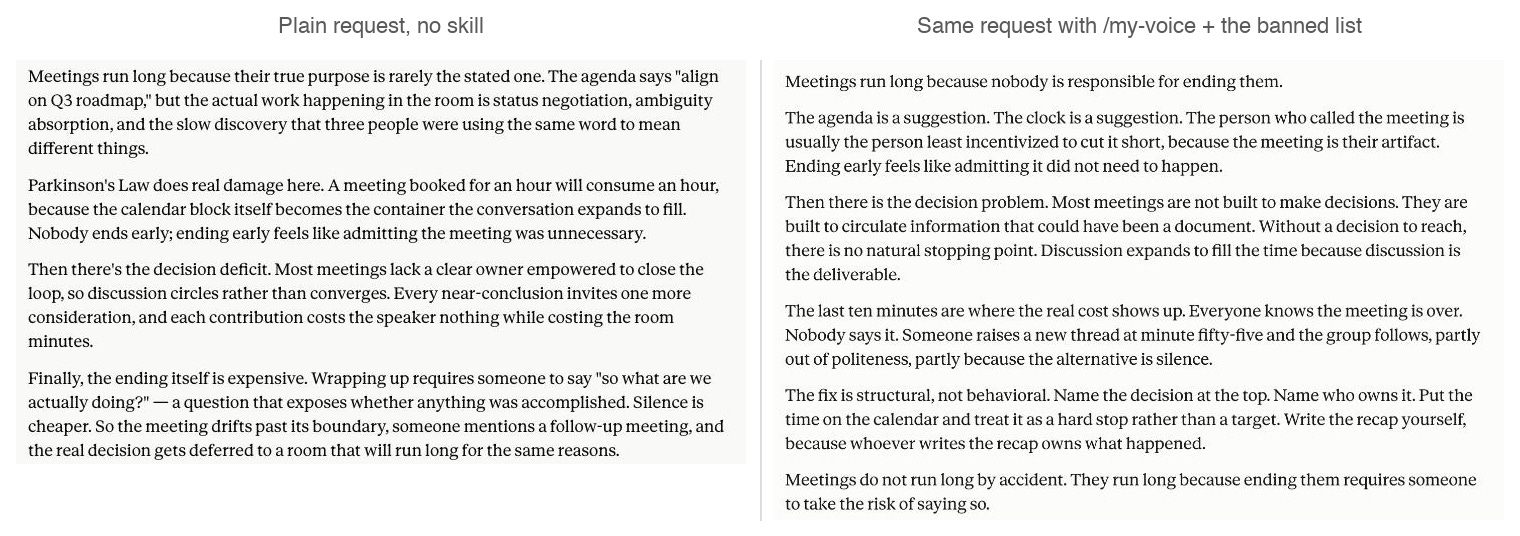
Same request, same Claude. The left one had nothing. The right one had the rules you’re about to steal.

You know the feeling. Two lines into a LinkedIn post, you close it. Nobody taught you the rules it broke. You just smelled robot.
Your readers have the same radar. So here’s the uncomfortable part: even with the voice skill you built last week, Claude’s drafts still slip into robot mode. An em dash pileup here, a “this isn’t just a launch, it’s a statement” there, and people quietly stop reading.
Good news: only six tells do most of the damage. Learn them once and you’ll spot them in seconds. Even better, you can teach Claude to delete them before a draft ever reaches you.
The answer up front, as always: learn the six tells, steal my banned-phrases list (the one this newsletter runs on), and paste it into last week’s my-voice skill. Drafts come out pre-scrubbed. Ten minutes. Works on every plan, Free included.
Last Week’s Homework
Last week you turned your best writing into a voice guide and saved it as a /my-voice skill. If you ran the blind test, you saw it work: drafts started sounding like you.
Today we add the other half. The voice guide covers what you sound like. It says nothing about the robot habits, and those leak into anyone’s voice. So the same skill gets a second section: the do-not list.
Last week’s P.S. asked which phrase Claude keeps putting in your mouth. Keep those coming. Every one belongs on the list you’re about to build.
Why the Drafts Sound Like That
Quick detour. Once you know why the tells happen, you’ll catch ones I never list.
Claude picks the most likely next word, and “most likely” means “what everyone writes.” Left alone, the writing drifts to the middle: safe and beige. When it’s not sure a point landed, it pads, and the padding is where the “pivotal moments” and the little summary bows come from.
That’s the house style of every AI model out there. Your reader has seen it ten thousand times. This time your name is on it.
The Six Tells
Learn these once and you’ll never unsee them, in Claude’s drafts or in your feed.
1. The em dash pileup
The most famous tell, fair or not. One dash is punctuation. Four in a paragraph is a signature:
“The launch went well — better than expected, honestly — though the real story is what came after — the retention numbers.”
Nobody types that. A machine does, constantly. The fix is boring on purpose: periods, commas, and parentheses do the same work quieter. (House rule around here: this newsletter bans em dashes outright.)
Straight from Claude, unprompted: the double-dash aside, mid-sentence. Nobody punctuates like this by hand.

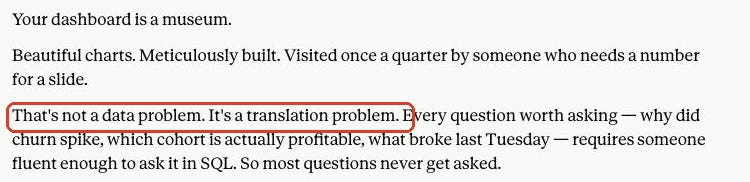
2. “It’s not X. It’s Y.”
The fake-deep contrast:
“This isn’t just a product update. It’s a statement of intent.” “Success isn’t about working harder. It’s about working smarter.”
The shape performs insight without containing any. Delete the first half and say the point straight: “This update shows we’re serious about enterprise.” If nothing useful is left once the setup is gone, there was no point to begin with.
Insight-shaped, insight-free. Delete the setup and see what’s left.
3. Everything comes in threes
“Faster, cheaper, and more reliable.” “Clarity, confidence, and control.” Triples feel complete, so the machine reaches for them even when only one item is true. Real writing is lumpy: one reason here, four over there. When you spot a matched set of three, ask which item is doing the work and cut the passengers.
4. Brochure words
Delve, leverage, seamless, robust, elevate, unlock, empower, game-changer, transformative, journey, landscape. The test is simple and brutal: would you say it across a table? “We can leverage this” no. “We can use this” yes.
Same family, different disguise: inflation. Not every update is “exciting,” not every decision is “crucial,” and almost nothing is “a pivotal moment.” Say the flat true thing and let the reader decide how big it is.
5. Vague where a fact should be
The biggest tell, and the one that survives careless editing. Compare:
“The team faced significant challenges this quarter.” “The team missed payroll twice this quarter.”
Machines abstract because they don’t know your specifics. You do, and that’s your entire advantage, so spend it. A draft with no number, name, or date anywhere reads like a form letter, because it is one. (This is also issue 2 paying off again: specifics can’t show up in the draft if they never went into the brief.)
Same update, same facts available. Only one sounds like a person who was in the room.

6. The wind-up and the bow
Openings that clear their throat: “In today’s fast-paced world,” “I hope this email finds you well.” Endings that restate the middle: “In conclusion,” “Ultimately, what this means is.” Plus the eager-assistant residue: “I hope this helps!”
Start where the point starts. Stop at the last point. The reader can handle the rest.
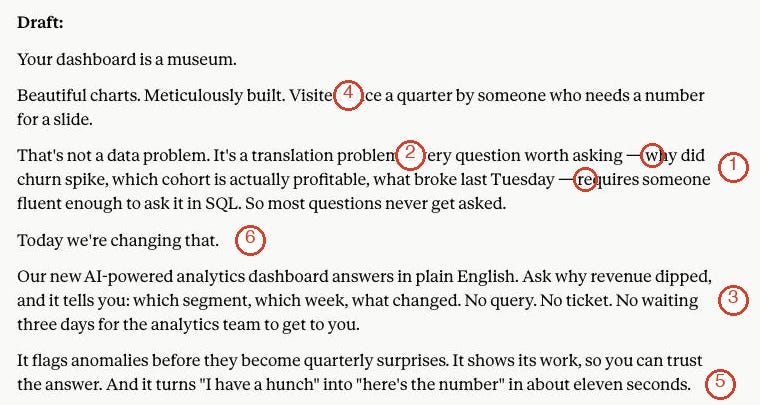
That’s all six. Most drafts carry two or three, and once you know the list, spotting them takes seconds.
All six on one draft. This is the ten-second scan you’ll be running by Friday without noticing.
The Banned List (Steal This Whole Block)
Here’s the deliverable: my working rules file, boiled down to a block that fits in a skill. This issue was edited against the full version of it.
## The anti-AI pass Before showing me any draft, edit it against these rules:

- No em dashes, ever. Use a period, comma, colon, or parentheses.

- Never write "It's not X, it's Y" or any sentence that rejects one

  idea to assert another. State the point directly instead.

- Banned words: delve, leverage, seamless, robust, elevate, unlock,

  empower, harness, streamline, game-changer, transformative,

  tapestry, landscape, journey (unless someone is actually traveling).

- Banned phrases: "I hope this finds you well", "in today's

  fast-paced world", "let's dive in", "it's important to note",

  "in conclusion", "I hope this helps".

- Don't force lists of three. Use the real number of points.

- Replace every vague claim with a number, name, date, or example.

  If you don't have one, ask me for it instead of writing filler.

- No warm-up intros and no summary endings. Start at the point,

  stop at the last one.

- Vary sentence length. If three sentences in a row have the same

  shape, break one.
That’s a starter kit, tuned to the tells above. It grows from here: every time you catch Claude putting a phrase in your mouth, add it to the bottom. Your list a month from now will be personal in a way mine can’t be.
Bolt It Onto Your Voice Skill (2 Clicks and a Paste)
Short click-along this week. Open Claude in a second tab.
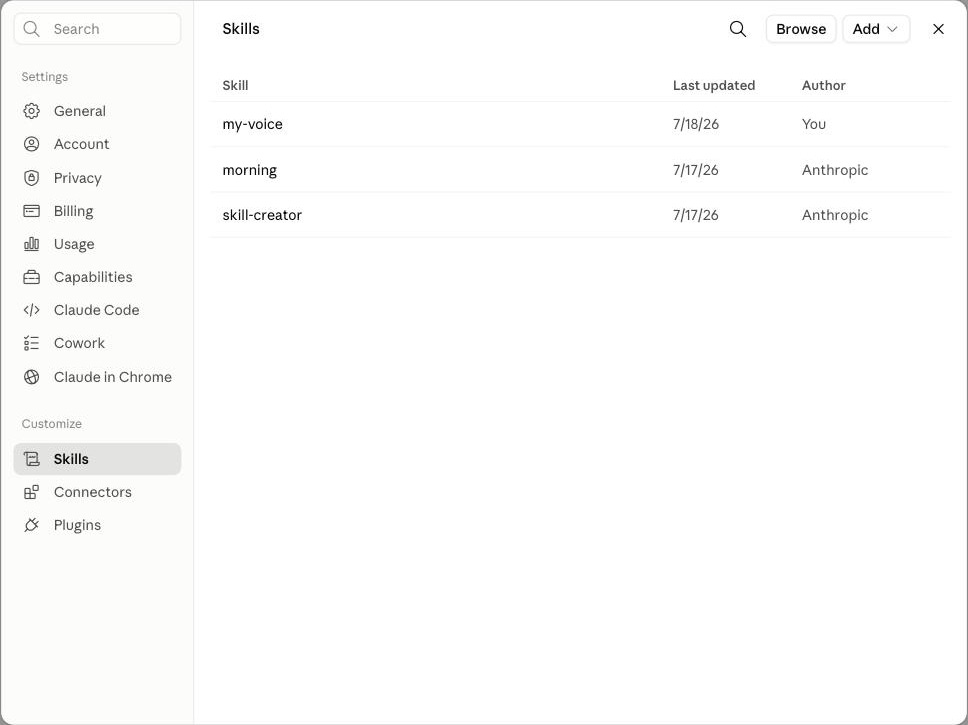
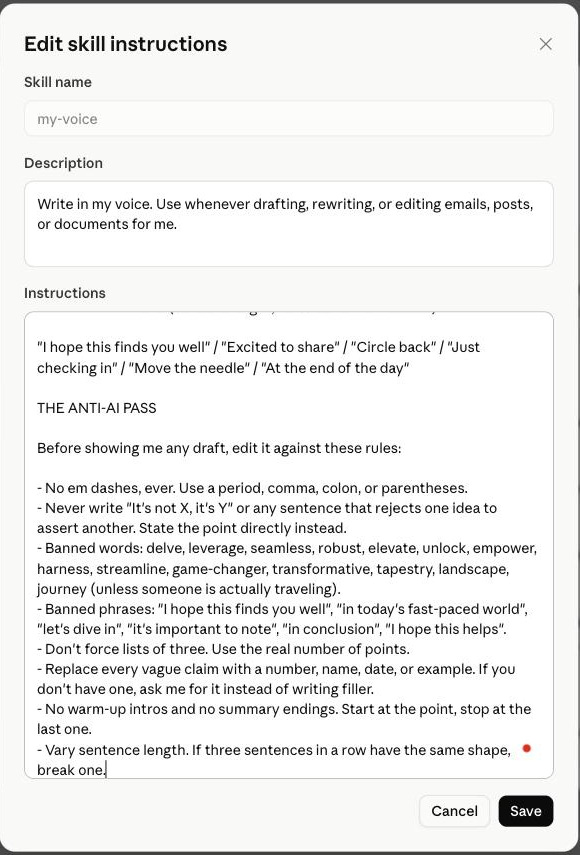
Step 1. Open your skill for editing. In any chat, click the + in the message box, then Skills → Manage skills. Your Skills page opens. Click your my-voice row from last week; it opens in a read-only view showing your voice guide. Now click the ⋮ menu in the top-right corner and pick Edit. A form titled Edit skill instructions opens, the same three fields you filled when you created it.
Same page as last week. Your my-voice row is about to get smarter.
Step 2. Paste the block at the bottom of the Instructions box and hit Save. Scroll to the end of your voice guide, paste the anti-AI pass under it, Save. A little “Saved changes to my-voice” toast confirms it. Done. Your skill now has two halves: the voice guide (what you sound like) and the banned list (what to delete). Every draft that goes through /my-voice, or gets the skill auto-loaded by its description, comes out pre-scrubbed.
⋮ → Edit, paste at the bottom, Save. One skill, two halves: voice on top, banned list underneath.
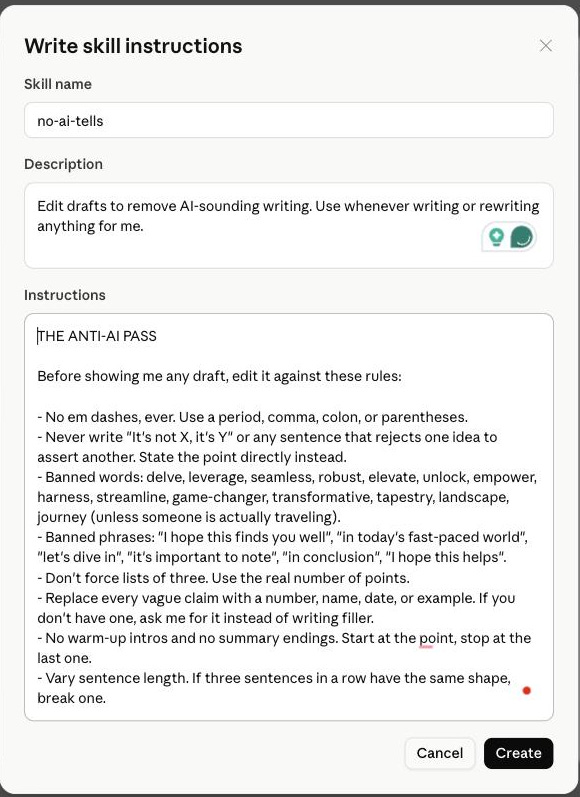
Skipped issue 5? You can still have this today. Same Skills page, click Add → Write skill instructions, and fill the form: name no-ai-tells, description Edit drafts to remove AI-sounding writing. Use whenever writing or rewriting anything for me., then paste the block as the instructions and hit Create. That’s the banned list as a standalone skill. It stacks fine with a voice skill whenever you build one.
The no-voice-skill-yet version. Ten minutes, still worth it.
One Prompt to Steal
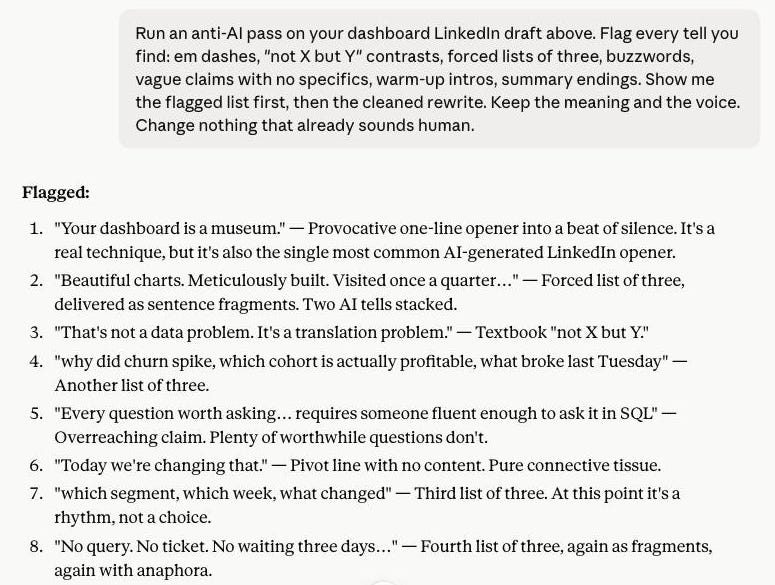
The skill covers what Claude writes for you. This one is for everything else: the report a colleague “wrote,” last year’s website copy, your own writing on an off day. Paste it above any text:
Run an anti-AI pass on the text below. Flag every tell you find: em dashes, "not X but Y" contrasts, forced lists of three, buzzwords,

vague claims with no specifics, warm-up intros, summary endings.

Show me the flagged list first, then the cleaned rewrite. Keep the

meaning and the voice. Change nothing that already sounds human.

[paste the text]
Don’t skip the flag list to get to the rewrite. Watch which tells show up in your own writing three drafts in a row. Those are yours. Knowing them by name is how you stop typing them.
The audit. The rewrite is useful. The flag list is the education.
Don’t Overcorrect
The honesty section, because this issue has a failure mode.
The tells are innocent one at a time. Em dashes predate the light bulb, and your favorite novelist uses them beautifully. “Delve” is a real word with a real job. What gives a draft away is the pile: dashes plus a triple plus “elevate” plus zero specifics, all in one email. You’re deleting the pile.
Scrubbing too hard is its own tell. Prose that visibly dodges every AI-ism goes stiff, and stiff reads machine-made too. If a fix makes the sentence worse, keep the original. The test never changes: read it aloud. If it sounds like you on a decent day, send it.
Claude will still slip. The skill raises the floor a lot; it doesn’t retire you as editor. Long drafts drift back toward house style, so keep a ten-second scan as the last thing before send. Cheap insurance for the thing that has your name on it.
Try It (Right Now): The 10-Minute Scrub
Generate a specimen. Fresh chat, no skill, ask: “Write 200 words on why meetings run long.” A plain request like that produces tells on demand.
Hunt. Count the dashes, the triples, the brochure words. My over/under is four.
Paste the banned list into
my-voice(or createno-ai-tellsif you skipped issue 5).Rerun the exact same request with the skill on. Read both versions out loud, back to back. That’s the whole issue in one A/B test.
Add one personal rule to the list: the phrase you’d never say that keeps showing up anyway.
The A/B that settles it. Same request, ten minutes of setup apart.
Do that and the next thing you send won’t trip anyone’s robot alarm, including yours.
Next Week
So far the series has Claude working with what you type. Next week it starts working with what you already have: the PDF you’ve been avoiding, the spreadsheet with nine tabs, the photo of the whiteboard. Upload them and get back finished work you keep editing. Feed Claude Your Files. See you then.
P.S. Which tell is your instant close-the-tab signal? Mine is the em dash pileup, though “It’s not just X” is gaining fast. Reply and tell me. The banned list grows one reader at a time.
Much love ✌️ MJ